

Short answer for Dallas business owners: A QuickBooks cleanup is a one-time project that takes a file with months of uncategorized transactions, unreconciled accounts and stale balances and brings it to a state your tax preparer can rely on. The work follows a fixed order: clear undeposited funds, remove duplicates, categorize everything, reconcile every bank and credit card account to its statement, then fix the balance sheet (opening balance equity, old receivables and payables, sales tax and payroll liabilities) and lock the period.
LUCI Financial Solutions does this for Dallas–Fort Worth businesses as a fixed-fee project scoped after a review of the file, and then keeps the books clean with monthly bookkeeping so you never need a second cleanup.
Signs your file needs a QuickBooks cleanup, not just a month-end close
A normal month-end close handles one month of activity. A cleanup is needed when the problems are older than the current month and have been compounding. You are in cleanup territory if any of these are true:
- The last bank reconciliation in QuickBooks is more than two months old, or there has never been one.
- The Profit & Loss shows large amounts in Uncategorized Expense, Uncategorized Income or Ask My Accountant.
- The bank balance in QuickBooks does not match the bank, and nobody can explain the difference.
- Undeposited Funds has a balance that keeps growing.
- Opening Balance Equity is not zero.
- Accounts Receivable shows invoices from customers who paid long ago, or Accounts Payable shows bills you know you settled.
- You are months behind on bookkeeping and have stopped opening the QuickBooks tab.
Two or more of those usually means the file cannot be fixed one month at a time. It needs a project with a start, an end and a person responsible for both. That is what our bookkeeping cleanup in Dallas service is for.
What to gather before the cleanup starts
A cleanup moves fast when the documents are ready and stalls when they are not. Collect these before the first working session:
| Item | Why it is needed |
|---|---|
| Bank and credit card statements for every month in the cleanup period | Reconciliation is done against the statement, not the bank feed. |
| Loan statements and amortization schedules | To split payments into principal and interest and tie the loan balance. |
| Merchant processor and payment app reports (card processor, PayPal, Stripe, Square or similar) | To match deposits net of fees and clear Undeposited Funds. |
| Payroll reports for each pay period and quarter | To reconcile wages, taxes and liabilities to what was actually paid. |
| Sales tax returns filed with the Texas Comptroller | To tie the sales tax liability account to what was reported and paid. |
| Last filed tax return and the prior year-end balance sheet | To confirm the starting balances the cleanup must land on. |
| Access: QuickBooks Online accountant invite, read-only bank access if available | So the team can work without borrowing your personal logins. |
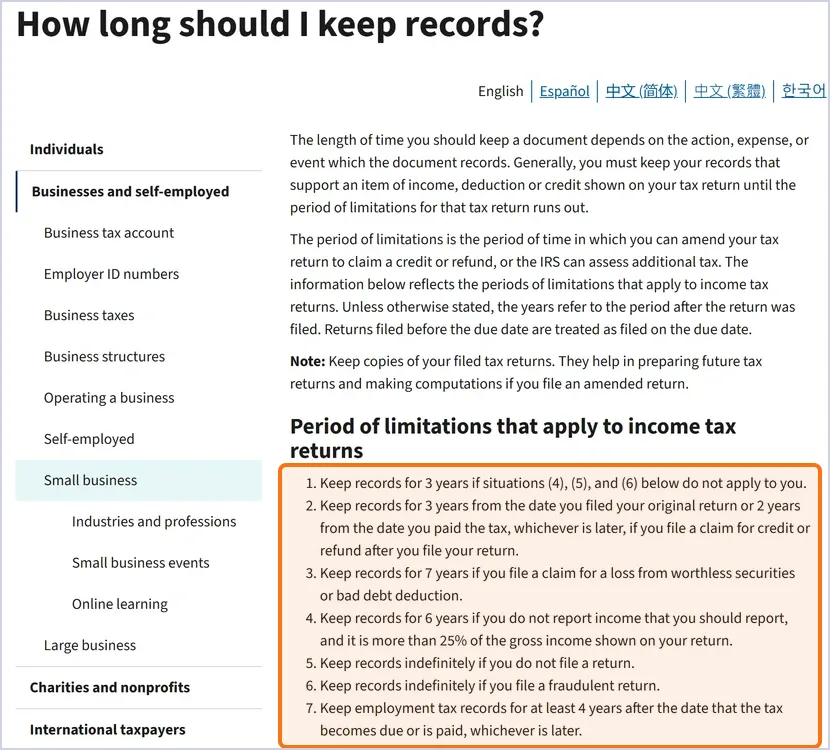
How far back should the cleanup go? Usually to the last year your tax preparer filed from, because the cleanup has to land on the balances that return reported. Keep the source documents longer than that: the IRS ties record retention to the period in which a return can still be examined or amended, generally 3 years after filing, and at least 4 years for employment tax records. Check the IRS list below before you shred old statements.
The QuickBooks cleanup checklist, step by step
The order matters: reconciling before duplicates are removed means reconciling twice. Work top to bottom.
Step 1: Establish the starting point
Decide the cleanup period. It usually starts the day after the last date the books were known to be right: the last reconciled month or the last filed tax return. Confirm the balance sheet on that date matches the return or the prior reconciliation.
Step 2: Clear Undeposited Funds
Undeposited Funds grows when customer payments are recorded but never matched to the actual bank deposit, and the deposit is then recorded a second time from the bank feed. Match each payment to its deposit, net of processor fees, and delete the duplicate deposits. A clean file has Undeposited Funds at or near zero at month end.
Step 3: Remove duplicate transactions
Duplicates come from importing the same bank feed twice, entering a bill and then also recording the payment as an expense, or recording a transfer on both sides as separate expenses. Sort each account by amount and date, find the pairs, and keep the one with the right detail.
Step 4: Categorize everything
Move every transaction out of Uncategorized Expense, Uncategorized Income and Ask My Accountant into the right account. Watch for the common miscodings: loan payments booked as expenses, owner draws booked as payroll or expenses, equipment purchases expensed instead of capitalized, sales tax collected booked as income, and personal charges mixed in with business ones.
Step 5: Reconcile every bank and credit card account
Reconcile each account, month by month, to the statement ending balance. Do not skip months and do not force a reconciliation with an adjusting entry to make the difference disappear. If a month will not reconcile, the difference is usually a duplicate, a missing transaction or one dated in the wrong period. Include loan accounts and lines of credit; their balances should tie to the lender’s statement.
Step 6: Zero out Opening Balance Equity
Opening Balance Equity is a holding account QuickBooks uses when accounts are created with a starting balance. It should be empty once setup is complete. A balance there means an entry was never finished. Trace each amount to its source and reclassify it to the correct equity, asset or liability account.
Step 7: Clean up old Accounts Receivable and Accounts Payable
Review every open invoice and bill older than 90 days. Paid invoices that were never matched to a payment get matched. Invoices that will never be collected get written off through a credit memo or bad debt entry, not deleted. Bills that were paid outside QuickBooks get matched to the payment.
Step 8: Reconcile sales tax liability
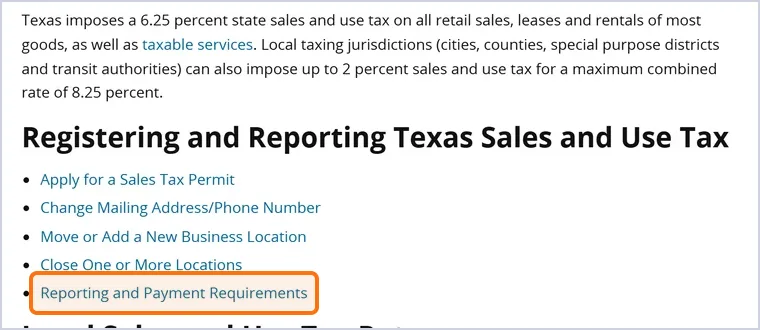
If you collect Texas sales tax, the sales tax liability account should equal what you have collected but not yet remitted to the Comptroller. Compare the account to each return you filed for the period. Differences usually trace to sales tax recorded as income or payments coded to an expense account.
Step 9: Reconcile payroll liabilities
Payroll liability accounts should match what is owed to the IRS, the Texas Workforce Commission and any benefit providers as of the period end. Tie each quarter to the filed payroll reports. Common problems: payroll tax payments coded to wages, employer taxes missing from the Profit & Loss, and owner compensation in an S corporation recorded as a draw instead of salary.
Step 10: Tidy the chart of accounts and lock the period
Merge duplicate accounts, make unused ones inactive, and rename vague ones so the next person understands them. Then set a closing date with a password so nothing before the cleanup date can be changed by accident. Run the statements one last time and confirm the bank accounts match and nothing is uncategorized.
What a one-time cleanup includes, how long it takes, and what it costs
A cleanup from LUCI covers the ten steps above for the agreed period, plus a written summary of what was changed and why, so your tax preparer is not surprised by the new numbers. It does not include ongoing monthly bookkeeping, payroll, sales tax filing or tax preparation; each is a separate service.
How long it takes depends on three things: the number of months, the number of accounts, and the condition of the records. We review the file before quoting, which is why we price cleanup as a fixed fee based on scope rather than an hourly estimate that grows. If you only want to know how bad things are first, the $597 Financial Review & Assessment is a 60-minute review of your QuickBooks file with a prioritized action plan.
What happens after the cleanup
A cleanup fixes the past. A file that was cleaned up once and then left alone is usually back in cleanup territory within a year. The fix is a monthly routine owned by someone accountable for it:
- Transactions categorized weekly from the bank feed, using the account rules set during the cleanup.
- Every bank, credit card and loan account reconciled to the statement each month.
- Undeposited Funds, AR and AP reviewed at each close.
- Financials reviewed by a senior accountant before they reach you.
- A closing date moved forward each month so the finished periods stay finished.
That is the routine behind our QuickBooks bookkeeping in Dallas service, and the detailed steps are in our month-end close checklist.
Frequently asked questions
My business is months behind on bookkeeping. Who can clean it up?
A bookkeeping firm that handles catch-up and cleanup as a defined project can bring a file months or even years behind back to current. LUCI Financial Solutions does this for Dallas–Fort Worth businesses as a fixed-fee project after reviewing the file, with a senior accountant checking the result.
What does a one-time QuickBooks cleanup include?
It includes clearing Undeposited Funds, removing duplicates, categorizing every transaction, reconciling each bank, credit card and loan account to its statements, fixing Opening Balance Equity, cleaning up old receivables and payables, tying sales tax and payroll liabilities, and locking the period. You should also receive a summary of what changed so your tax preparer can follow it. Monthly bookkeeping afterward is a separate service.
Who can fix categorization and reconciliation problems in QuickBooks?
Any experienced QuickBooks Online bookkeeper can recategorize transactions, but reconciliation gaps across many months call for a team that works in a set order and documents each change. Our bookkeeper has seven years in QuickBooks Online and every cleanup is reviewed by a senior accountant before it is handed back.
Can old bank and credit card accounts still be reconciled?
Yes, as long as the statements exist. Closed accounts, old lines of credit and credit cards that were paid off can all be reconciled month by month to their statements and then marked inactive. Download statements before an account closes; retrieving them later is harder.
How long does a QuickBooks cleanup take and what does it cost?
It depends on the number of months, the number of accounts and the condition of the records, so there is no honest standard number. LUCI reviews the file first and then quotes a fixed fee for the full scope, so the price does not grow as the work uncovers more. If you want a diagnosis before committing, the $597 Financial Review & Assessment produces a prioritized action plan in 60 minutes.
Will my books stay clean after the cleanup?
Only if someone owns the monthly routine: weekly categorization, monthly reconciliations, a review of AR, AP and Undeposited Funds at each close, and a closing date that moves forward every month. Most of our cleanup clients continue into monthly bookkeeping for exactly that reason. A cleanup without a routine behind it is a temporary fix.
Get the file fixed before the tax deadline
Send us the state of your books and we will tell you whether you need a full cleanup or a review first. Schedule a consultation with LUCI Financial Solutions and you will get a fixed-fee scope, a timeline and a plan to keep the books clean afterward.